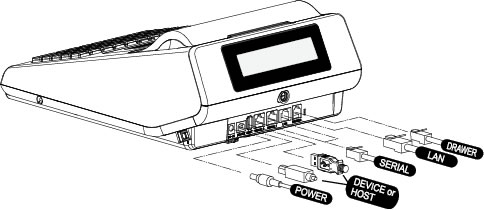
The RJ-11 plug coming from the cash drawer is plugged into the port on the right of this picture, marked "drawer".
Note: it will only fit one way.
Turn register on using a switch on the right side.
To Charge, use the power adaptor and plug into the round port, in this picture on the left, marked "Power".
Float in the Cash Register
Every Cash drawer has a float of $300.00
11 $20 notes
11 $5 notes
10 $2 coins
10 $0.50 Coins
Entering a sale
Make sure the register is in "register Mode"
If not, [3] [MODE]
Make sure it says [OPEN}
If [CLOSED] enter [1][CLERK]
enter the number of BOTTLES eg [1] or [5] or [16]
[X/Time] (ie "times")
the style eg [HPA] or [Original] [Pink][Ginger][Jalap]
Enter the amount of cash received in dollars AND cents eg [5][0][00] ($50.00)
Enter [CASH]
This will now show the total price, the amount tendered and the change.
The Cashdrawer should open automatically, without the need for a key.
Running Daily Totals
(giving the daily totals, does not reset to zero)
Using X-mode
Press [4][MODE] -- enter manager mode.
Press [CASH] -- reports mode
Press [1] Financial reports.
press [CASH] (sub section financial)
press [CASH]
Using Z-mode
(giving the daily totals, does reset to zero)
Same as X-Mode
Setting the time eg after a daylight saving change.
[Program Mode]
[6] for time
[cash]
type current time in 24 hour format
Create new PLU
[6][MODE] (enter program mode)
[1][CASH] -- PLU
[1][CASH] -- add/change
[1][CASH] -- (change) one PLU ([2] would be a range of PLUs)
Enter PLU # [CASH] (either the one to change or one to add) as in: [5][CASH] or [15][CASH]
If the PLU exists, it will show the description, otherwise it will show "PLU#" (# being the number of the PLU)
If you want to change, for instance
the description,
press [CASH] --> start typing the new description.
press [CASH] to save
press [CLEAR] to go back to previous menu.
keep pressing [CLEAR] until you are back at "Programming Mode"
the price,
check you have the correct description, then
[CHECK (arrow down)] --> it should say 2.PRICE/HAL01 [price]
press [CASH] --> it should state the current price; start typing without using a decimal point.
press [CASH] to save the new price.
Press [CLEAR] to return to previous menu.
keep pressing [CLEAR] until you are back at "Programming Mode".
Connecting ER230EJ to computer
The ECR has to be [ON] in order to communicate with the computer.
Use a USB cable, pluged into port marked "HOST" on the back of the ECR.
Double click eSpresso icon to open program.
UAC (user account control) comes up with a warning.
Accept.
The screen of the ECR will display "PC ONLINE MODE". (if it does not [TURN POWER OFF and back ON])
If it still not connects:
On the ECR select [SERVICE MODE]
[5] Define port
[3] USB type
Set to PC-COM
A new window opens.
In the left sidebar
* Favourites
* Home
Halfway down the page:
[] Hart & Hound
[] Register 1
(note: a right-click will give a dropdown box, [CHECK STATUS] and [ECR information]
(when you click on [STATUS] the ECR should show "PC ONLINE MODE".)
([ECR information] will give just that: model number, version, checksum, boot, IP address and Mac address)
If the ECR is NOT connected, [CHECK STATUS] and [ECR information] will result in a COMMUNICATION ERROR. However the ECR can still show [PC ONLINE MODE]. You can "CLEAR" this by pressing [CLEAR] on the ECR.